Every software release brings more to understand, more to secure, and more to keep up to date. Security teams rarely get more time to do it.
In more than 15 years of working with enterprises, we've seen how that pressure builds: applications evolve, teams ship changes, and security teams struggle to assess new risks while keeping existing models and security decisions up to date.
That workload adds up quickly. When the same experts are stretched across new designs, remediation, and ongoing changes, risks can go undetected and critical security gaps persist.
NexusAI helps teams close those gaps by taking on more of the modeling and analysis work, giving security experts more time to identify and address the risks that matter.
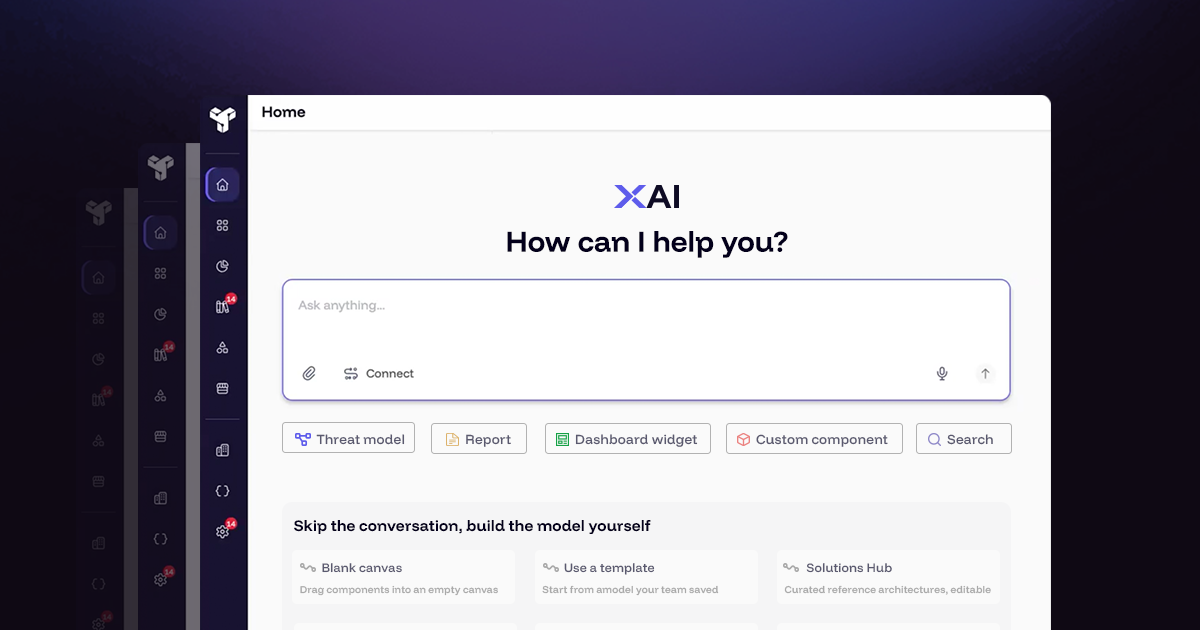
Built into ThreatModeler Nexus, NexusAI puts the architecture context you already have to work. Teams can threat model faster, focus on relevant risks, and keep security decisions aligned as software changes.
Security spends less time manually creating models and chasing updates, with more capacity to investigate risks and guide remediation across applications.
Faster, easier threat modeling
With NexusAI, you skip the time-consuming process of piecing together architecture from scattered diagrams, documents, and code.
Share a diagram, design document, screenshot, infrastructure-as-code file, code repository, or simply describe the system. Then ask it to build a model. NexusAI will analyze available information, ask about missing details, and create a threat model preview.
For example, a diagram might show the main services while a requirements document explains the data they handle. NexusAI brings those inputs together, helping you build a fuller picture without translating each source into the model yourself.
It also matches identified components to your organization's libraries. Where a match is uncertain, you can confirm the right component or choose an alternative before saving the model.
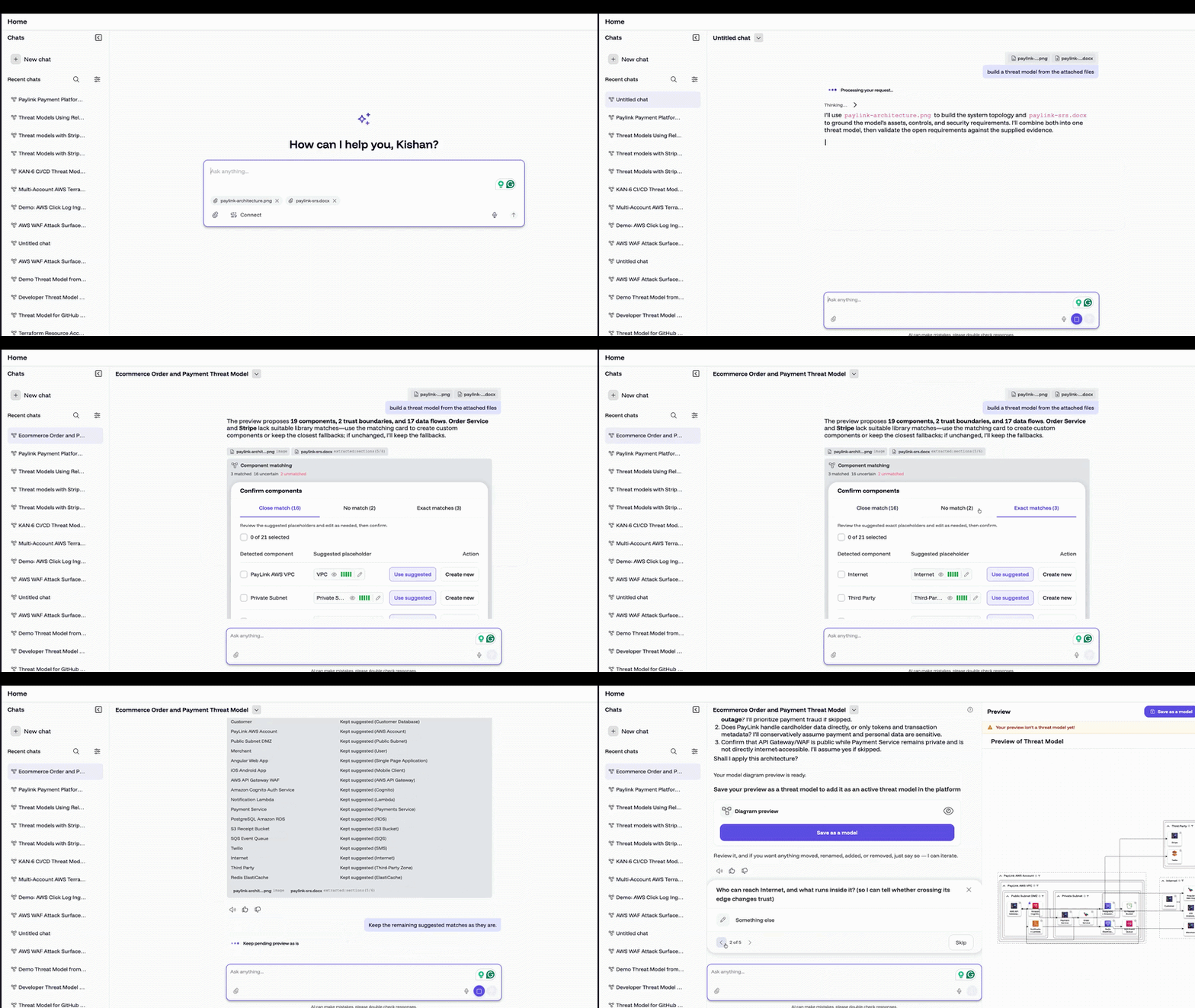
Using connectors to connect repositories also streamlines the modeling process. NexusAI analyzes your repository to identify the services and resources described in the code, with references to the relevant files and lines.
The agent handles the model-building groundwork, freeing your team to focus on where the system is exposed and how to secure it.
Focus on the risks that matter
Once a model is created, the next question is what to do with its findings.
- Which threats apply to this architecture?
- Is there evidence that a security requirement has been met?
- What still needs investigation?
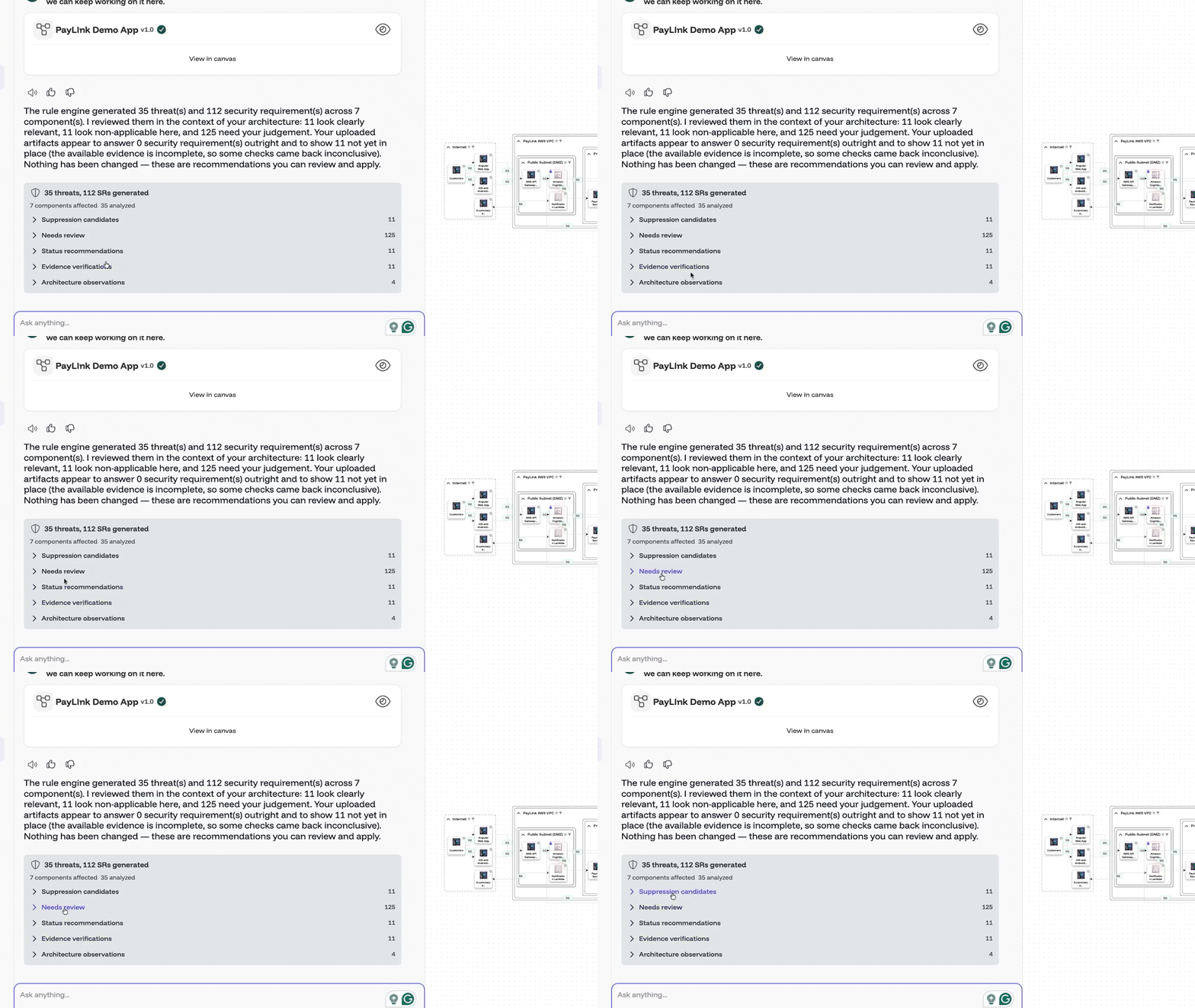
NexusAI helps answer those questions. It assesses threats and requirements against the system context, identifies findings that may not apply, and explains why.
The agent can also analyze attack paths and suggest a remediation order, giving your team a starting point for deciding where to focus.
All recommendations come with reasoning you can inspect. NexusAI checks supplied code, documents, diagrams, and confirmed answers for evidence, and shows evidence-strength and confidence signals. If the information is incomplete, it flags the gap rather than treating a control as verified.
Your team decides which recommendations to apply, and approved changes are recorded. Where evidence is incomplete, NexusAI makes that clear and leaves the judgment with your security experts. The value is less time working through findings from scratch and a clearer basis for the decisions that follow.
Keep pace with modern development
Software changes quickly, and threat models can fall behind just as fast. Keeping them current takes time your security team is already short on, but letting those models drift means making security decisions from an outdated picture.
NexusAI closes that gap by monitoring connected sources for architectural changes and preparing model updates based on those changes for your approval.
.png)
Through MCP, it draws on repositories, documents, and work items from sources including GitHub, GitLab, Google Workspace, and Jira or Confluence. Your team can base security decisions on the architecture reflected in those sources, requiring less manual work to consistently build and maintain threat models.
The connection also runs the other way. Through the ThreatModeler Nexus MCP Server, AI assistants and IDEs can call into the platform directly, including Claude, ChatGPT, Cursor, and VS Code with Copilot, as well as CI/CD pipelines. A developer can create or update a threat model, generate security requirements, and get secure design guidance without leaving the tool they're working in.
Schedule daily or weekly checks of connected sources, and NexusAI identifies architectural drift, explains what changed, and stages the model update for review. Optional email notifications let you know when a check has run, so security experts stay in the loop.
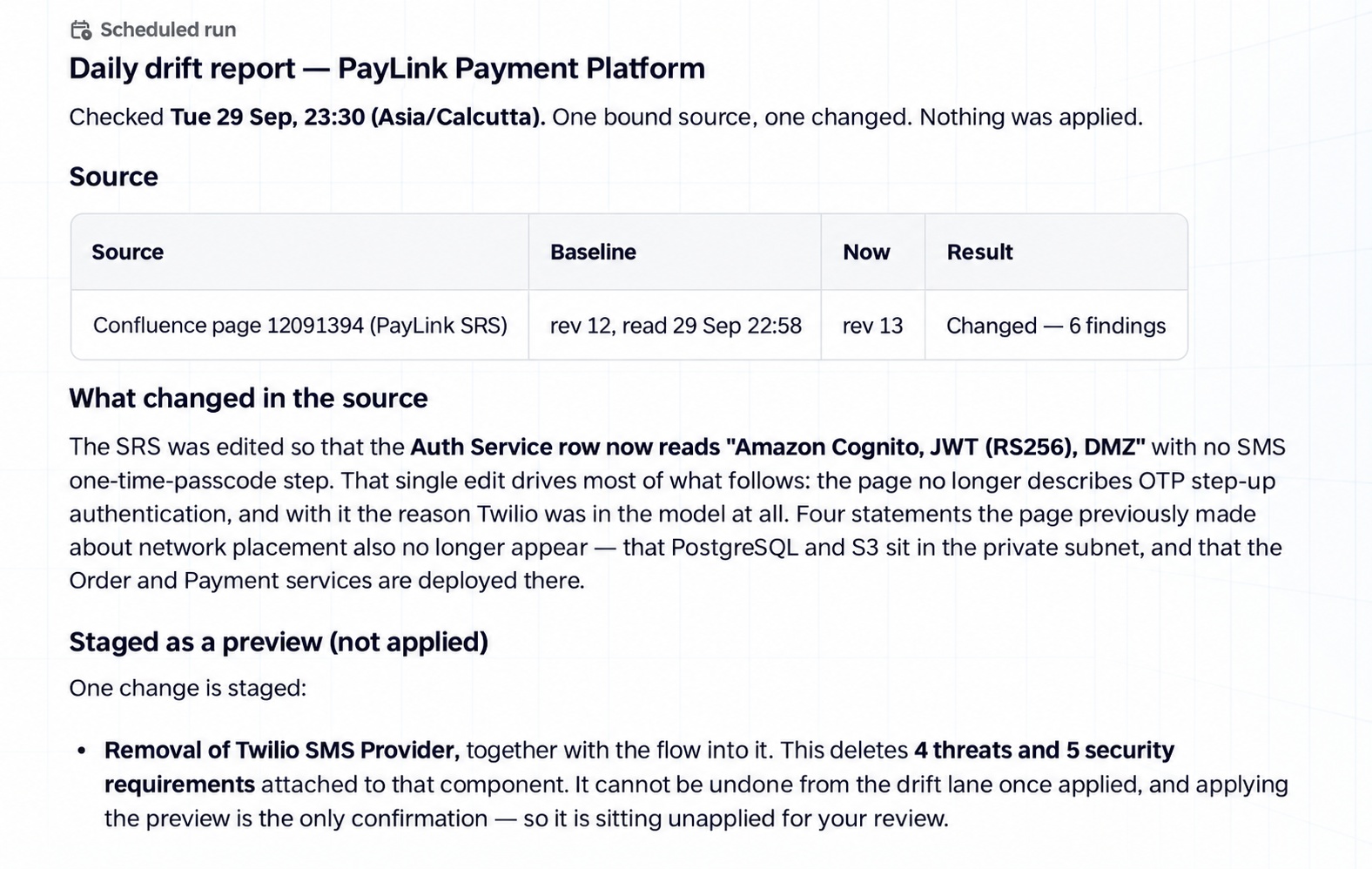
You can assess the update before applying it. Each applied change creates an audit entry and a restore point.
This makes continuous secure design more practical and efficient. Teams spend less time checking sources and reconstructing changes by hand, while keeping their models accurately aligned with the architecture they need to assess.
Backed by the Secure Design Graph
The work NexusAI does draws on the same security knowledge powering ThreatModeler Nexus: the Secure Design Graph.
The Secure Design Graph connects architecture, component relationships, threats, and security requirements into a living model of your system.
That gives the new agentic experience a foundation built on more than a decade of curated security content and threat research, which will draw on the combined libraries of ThreatModeler and IriusRisk.
The platform puts that patent-backed knowledge to work when it builds a model or helps your team assess a finding. Through NexusAI, that depth becomes practical help with high-value security work across your team:
Your team's security knowledge compounds
When your team defines a component and its associated threats and requirements, that work can be reused in models that use the component. This means teams build on established security definitions without having to recreate them for every application.
More (non-security) teams can participate in secure design
NexusAI makes that knowledge easier to work with through plain-language requests and existing project materials. Developers and application teams can contribute context and get modeling work underway, while security experts retain control of the decisions that need their judgment.
Security analysis stays grounded in your architecture
NexusAI considers what a component is, what it connects to, and the evidence supplied for it. Recommendations come with reasoning your team can assess, and gaps in the evidence are made clear.
Less groundwork. Greater security coverage
With AI-accelerated development, every release brings more to understand and secure. Asking the same experts to absorb all that work is not a sustainable answer.
Thanks to an agentic threat modeling experience, NexusAI changes how much of that security work your team has to shoulder.
Your experts spend more time securing the system and less time piecing it together from scattered context. And with reusable security knowledge in the Secure Design Graph, that expertise reaches beyond a single application.
Discover faster, easier, and more connected threat modeling with ThreatModeler Nexus today.
Frequently asked questions
What is NexusAI?
NexusAI is the agentic threat modeling experience built into ThreatModeler Nexus. It turns diagrams, documents, code, and plain-language descriptions into threat models, assesses which threats and security requirements actually apply, and keeps models aligned as architecture changes.
What inputs can NexusAI use to create a threat model?
A diagram, a design document, a screenshot, an infrastructure-as-code file, a code repository, or a plain description of the system. NexusAI analyzes what is available, asks about missing details, and produces a threat model preview for your team to approve.
Does NexusAI make security decisions on its own?
No. NexusAI proposes recommendations with the reasoning behind them, including evidence-strength and confidence signals. Your team decides which ones to apply, and every applied change creates an audit entry and a restore point. Where evidence is incomplete, NexusAI flags the gap rather than treating a control as verified.
How does NexusAI keep threat models up to date?
It monitors connected sources through MCP, including GitHub, GitLab, Google Workspace, and Jira or Confluence, on a daily or weekly schedule. When it detects architectural drift, it explains what changed and stages a model update for your review before anything is applied.
What is the Secure Design Graph?
The Secure Design Graph connects architecture, component relationships, threats, and security requirements into a living model of your system. It is the patent-backed knowledge base NexusAI draws on, and it grows as your team defines components and reuses them across models.